
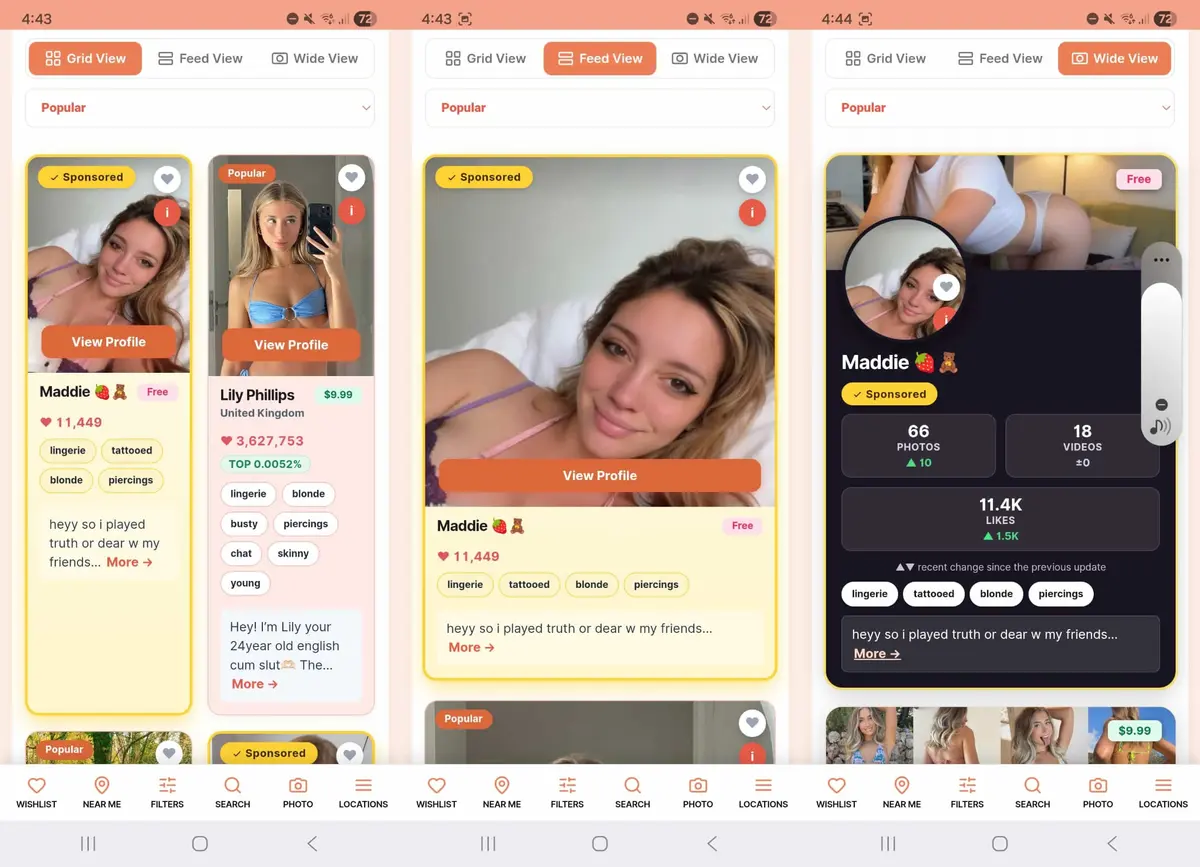
Browsing FindaPeach just got a lot more flexible. However you like to look for creators, there's now a layout to match. Every search, location and tag page on FindaPeach.com can be shown three different ways (Grid, Feed and Wide), and you can switch between them instantly using the toggle at the top of any results page. Each view shows the same creators; they simply present them differently, so you can pick whichever suits the moment. Here's what each one does and when to reach for it.
Grid View

Grid View is the classic, compact layout, with two creators side by side so you can scan a lot of profiles at a glance. It's the fastest way to browse, lining creators up next to each other so you can compare them and spot someone who catches your eye without endless scrolling. If you want to see a lot of creators quickly, start with this one.
Feed View

Feed View gives each creator the full width of your screen, one at a time, like scrolling a social feed. The larger images make it much easier to actually see who you're looking at, and the relaxed, one-at-a-time pace is perfect for casual browsing rather than rapid-fire comparison. Choose this when you'd rather take your time and focus on the photos.
Wide View

Wide View is the most detailed of the three, laid out like a creator's own profile: banner image, large avatar and a full stats panel. You get their photo, video and like counts at a glance, along with the recent change since the last update, so you can see who's active and growing as well as how they look. It's the best view for digging into the numbers and finding the genuinely busy, in-demand creators.